

WooCommerce to Shopify Migration Services
Move your WooCommerce store to Shopify with your products, customers, orders and blog intact, and your Google rankings protected with 301 redirects. Done for you by a Shopify Partner, while your WooCommerce store stays live until launch day.
WooCommerce to Shopify
Switch From WooCommerce to Shopify Without Losing Data or Rankings
Many store owners outgrow WooCommerce. Plugin updates break things, hosting and security become your job, and the checkout needs constant work. Shopify takes care of hosting, security and checkout, so you can focus on selling.
We migrate your WooCommerce store to Shopify for you: products, customers, orders, reviews and blog posts, plus a full 301 redirect map so the pages Google already knows keep their traffic. Your WooCommerce site stays online until your new Shopify store is tested and ready.
- What we move from WooCommerce
- Products and variations
- Categories and tags
- Customers
- Order history
- Reviews
- Blog posts and pages
- Coupons
- SEO titles and URLs
WooCommerce vs Shopify
Why Store Owners Move From WooCommerce to Shopify
These are the reasons WooCommerce sellers tell us they want to switch.
No More Plugin Headaches
WooCommerce depends on many plugins that need updates and can conflict. Shopify includes the core store features, with apps for the rest.
Hosting and Security Included
Shopify hosts your store, keeps it secure and handles SSL, so you no longer manage servers, caching or security plugins.
A Faster, Proven Checkout
Shopify checkout and Shop Pay are built for conversions, with Apple Pay, Google Pay and PayPal ready to switch on.
Room to Grow
Sell on TikTok Shop, Facebook, Instagram and Google from one dashboard, and move up to Shopify Plus when you scale.
Moving a large store to Shopify Plus? We handle WooCommerce to Shopify Plus migrations too, including large catalogs and wholesale customers, on our Advanced plan.
What We Migrate
How Your WooCommerce Data Moves to Shopify
Every part of your WooCommerce store has a place in Shopify. Here is where each one goes.
Products and Variations
Become Shopify products and variants with images, SKUs, prices, sale prices, stock and weights.
Categories
Your product categories become Shopify collections, with descriptions and SEO details.
Tags and Attributes
Tags carry over, and attributes such as size and color become Shopify product options.
Customers
Names, emails, addresses and order counts move over. Passwords cannot be transferred, so we help you invite customers to reactivate their accounts.
Order History
Past orders move to Shopify so you keep your sales records and customers can see their history.
Product Reviews
We move your reviews into a Shopify review app so your social proof stays on each product.
Blog Posts and Pages
WordPress posts and pages move to the Shopify blog and pages, with images and formatting checked.
Coupons and Gift Cards
Active coupons are rebuilt as Shopify discount codes. Gift card balances are moved where possible.
Using a custom plugin or a feature not listed here? Tell us on your free consultation and we will find the right Shopify app or build it.
SEO-Safe Migration
Keep Your Google Rankings When You Leave WooCommerce
WooCommerce and Shopify use different URL formats. Without redirects, the pages Google already ranks would show errors. We map every old URL to its new Shopify page.
A Full 301 Redirect Map
Old product links like /product/blue-shirt/ point to /products/blue-shirt, and category links point to the matching Shopify collection. Every product, category, page and post is redirected.
SEO Details Moved
Page titles, meta descriptions, image alt text and URL handles move with your content, so nothing has to be rewritten from scratch.
Search Console Handover
After launch we submit your new sitemap to Google Search Console and check for crawl errors, so Google picks up the change quickly.
Want the details first? Read our WooCommerce to Shopify migration checklist.
WooCommerce to Shopify Migration Pricing
Fixed-price WooCommerce to Shopify migration packages. You get a fixed quote before we start, with no surprise costs.
Starter
For small storesStandard
For growing storesAdvanced
Starting price for large storesVerified Google Reviews
Posted on Google
 Rachelle Avril
Trustindex verifies that the original source of the review is Google.
Ameer is a great web designer—very patient, professional, and attentive to his clients’ needs. He takes the time to listen to your concerns, understand your vision, and make updates according to your preferences. He works with you throughout the entire process and continues making adjustments until you are completely satisfied with your website. I highly recommend him to anyone looking for a professional, patient, and dedicated web designer!Posted on Google Tony DavisI am hired him for e-commerce A few times and he did a wonderful jobPosted on Google
 Tokode AjibolaPrimora Commerce is simply the best agency out there- they have have my business scale with exceptional service. Thank you and would recommendPosted on Google
 Kay LouisI had such a great experience with Primora Commerce. Everything felt easy, smooth, and professional from start to finish. I really appreciated how clear and organized the website was, and you can tell there’s genuine care behind the business. It feels trustworthy, thoughtful, and very well put together. I would definitely recommend Primora Commerce and will absolutely support again!Posted on Google
 Sahara SeiditaWe had a smooth and good cooperation, strongly recommendedPosted on Google
 Sharon LipfordI would DEFINITELY recommend. Service was GREAT. Communication during and after the process was Great!! Any questions I had were answered. I definitely RECOMMEND if you want it done RIGHT THE FIRST TIME!!Posted on Google
 Krista ZigulisI hired Primora Commerce to help me with my TikTok Shop store. My store was not cut and dry, as I was having issue linking to my Shopify website. He worked very fast and set up everything for me quickly. He linked everything properly and I began getting traction on TikTok shop. I wish I had found him prior to the stress I went through setting up my FB and IG shop a long time ago. Will hire again.Posted on Google
 Mary KuiperPrimora Commerce was vey helpful and responsive in setting up a new TikTok store for my business, especially after my old store attempt had been rejected multiple times by TikTok. Highly recommend!!Posted on Google
 Wissam AllowThanks a lot primora commercePosted on Google
 R LPrimora Commerce has provided excellent service from start to finish. They helped me troubleshoot and activate my TikTok Shop, including resolving a restricted-category issue that was preventing me from publishing my products. They also helped me successfully connect my Shopify store to TikTok and get everything up and running smoothly. Later, I worked with Primora Commerce again for help with my Amazon store, and once again, the experience was great. They are extremely knowledgeable, responsive, and clearly understand the ins and outs of e-commerce platforms. I’ve had a great experience working with them and would definitely highly recommend Primora Commerce to anyone needing help with TikTok Shop, Amazon, Shopify, or e-commerce in general.
Featured Shopify Project
Meme Beauty Depot
Premium Shopify Store Design & Development
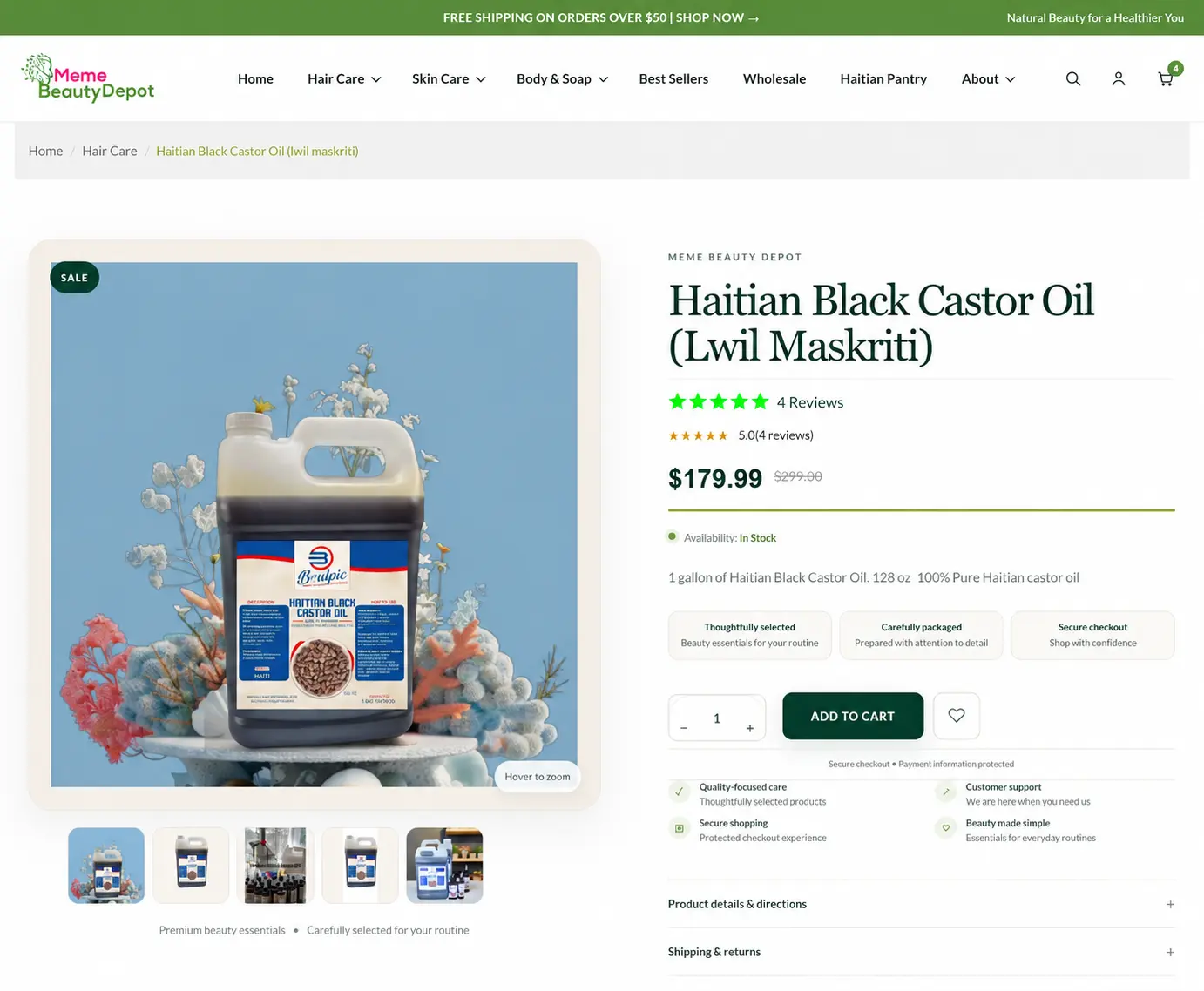
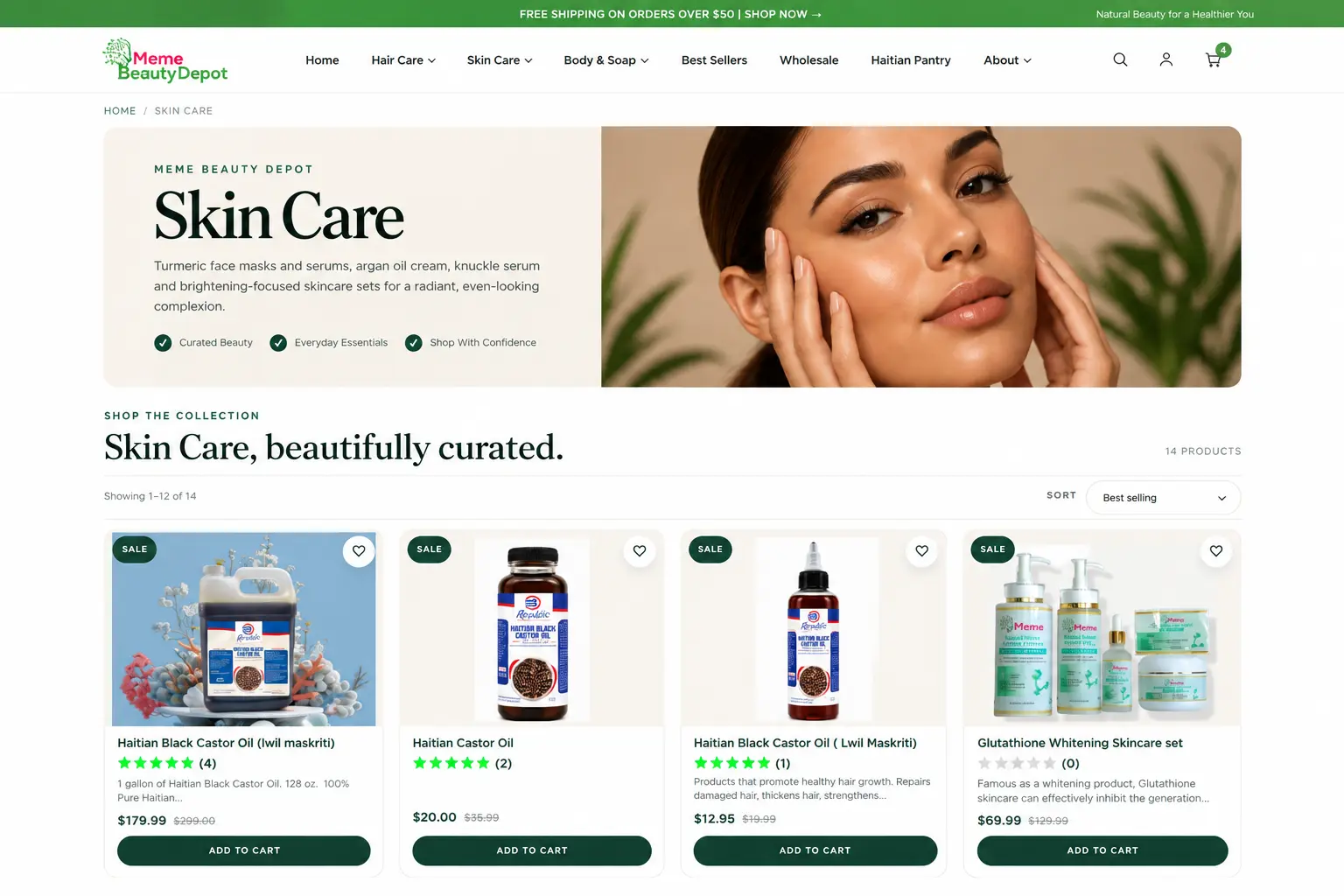
We designed and developed the Shopify storefront for Meme Beauty Depot, a hair, skin and body care brand, creating a clean shopping experience that works beautifully on desktop and mobile.
- Shopify Store Design
- Custom Development
- Mobile Optimization
- eCommerce UX
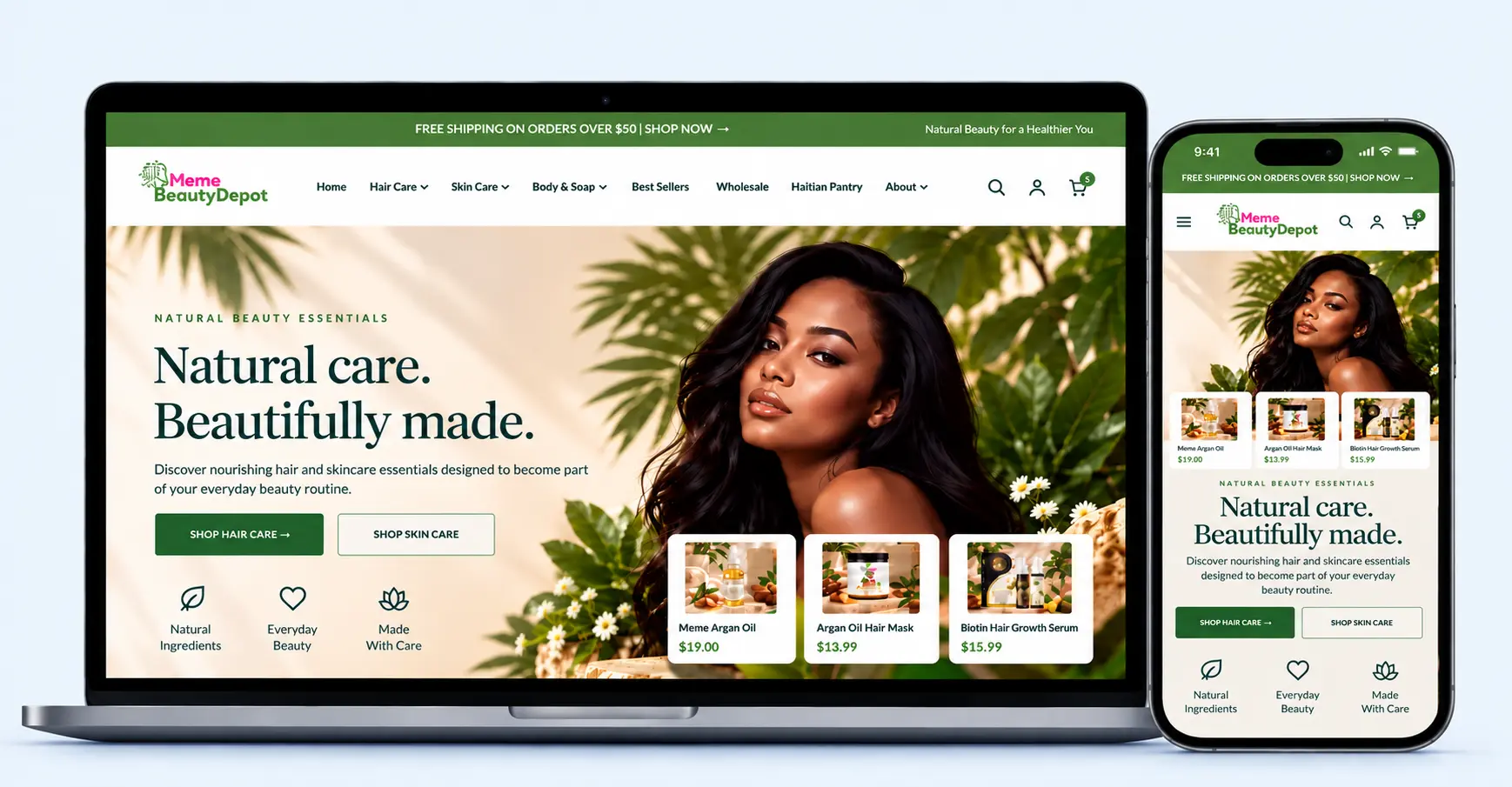
The Result


Client Testimonial
What We Built
Custom Store Design
A modern, premium design tailored to Meme Beauty Depot’s brand and product line.
Premium Homepage
Custom hero section, featured collections, and brand storytelling built for first impressions.
Product & Collection UX
Organized product discovery across hair care, skin care, and body care categories.
Mobile Optimization
Fully responsive design built for a seamless shopping experience on any device.
Conversion-Focused Layout
Clear calls-to-action and structured sections designed to guide visitors toward purchase.
Brand Experience
Custom sections and styling that reflect the brand’s identity throughout the store.
Client Success Stories
Hear From Our Clients
See what business owners have to say about their experience working with Primora Commerce.
Our Process
How Our WooCommerce to Shopify Migration Works
A clear, six-step process. Your WooCommerce store keeps selling until the switch.
- 01
Free Store Audit
We review your WooCommerce store, plugins, product count and rankings, then send a fixed quote.
- 02
Shopify Setup
We set up your Shopify store, theme, payments, shipping and taxes.
- 03
Data Migration
We move products, customers, orders, reviews and blog posts from WooCommerce.
- 04
Redirects and SEO
We build the 301 redirect map and move titles, descriptions and alt text.
- 05
Testing
We check products, prices, checkout and redirects before anything goes live.
- 06
Launch and Support
We connect your domain, submit your sitemap and support you after launch.
Most WooCommerce to Shopify migrations take 1–3 weeks, depending on your product count and custom features.
Before We Start
What We Need From You
Have these ready and your migration will move faster. Not sure about any of them? We will help on your free consultation.
WooCommerce Access
- WordPress admin access (a temporary admin user is fine)
- A list of the plugins you rely on
- Any custom features or checkout rules
- Your hosting login, if exports are restricted
Shopify and Domain
- Your Shopify store, or we create one for you
- Login to your domain registrar for launch day
- Your payment provider details (Shopify Payments or PayPal)
- The theme or design style you want
Compare WooCommerce Migration Plans
See what each WooCommerce to Shopify migration plan includes and choose the right one for your store.
| Feature | Starter$499 | Standard$899 · Most popular | AdvancedFrom $1,499 |
|---|---|---|---|
| Products | Up to 100 | Up to 1,000 | 1,000+ |
| Products, collections and customers | ✓ | ✓ | ✓ |
| Pages and policies | ✓ | ✓ | ✓ |
| 301 redirects for old URLs | Products and pages | Full redirect map | Full redirect map |
| Order history | — | ✓ | ✓ |
| Blog posts and images | — | ✓ | ✓ |
| SEO titles and meta descriptions | — | ✓ | ✓ |
| Theme setup and branding | Free theme setup | Theme setup and branding | Custom theme design |
| Reviews, coupons and gift cards | — | — | ✓ |
| App replacement and integrations | — | — | ✓ |
| Magento, BigCommerce and complex stores | — | — | ✓ |
| Support after launch | 14 days | 30 days | 60 days priority |
Every migration includes a free audit and a fixed quote before we start. Shopify plan, paid theme and app subscriptions are not included.
Free Migration Guides
Planning Your Move From WooCommerce?
Read our guides before you start, or let us handle everything for you.
Moving from another platform? See all our Shopify migration services.
Frequently Asked Questions
Answers to the questions store owners ask most before moving from WooCommerce to Shopify.
Our WooCommerce to Shopify migration packages start at $499 for up to 100 products. Standard is $899 for up to 1,000 products with order history and blog posts, and Advanced starts at $1,499 for larger stores, reviews, coupons and custom design. You get a fixed quote after a free audit.
Most migrations take 1–3 weeks. Small stores with simple products can be done in about a week. Stores with thousands of products, custom plugins or a custom theme take longer.
Not if the migration is done properly. We set up 301 redirects from every old WooCommerce URL to its new Shopify URL and move your titles, meta descriptions and alt text. A short dip in traffic right after launch is normal while Google recrawls your store.
Products and variations, images, categories, tags, customers, order history, reviews, blog posts, pages and coupons. Customer passwords cannot be transferred for security reasons, so customers are invited to reactivate their accounts.
Simple stores can use a migration app from the Shopify App Store or a CSV export to move basic product data. Free tools usually do not handle order history, reviews, redirects, SEO details or custom fields, which is where a professional migration saves time and protects your rankings.
Yes, several Shopify apps can import WooCommerce data. We use the right tools for your store and then check and fix the results by hand, including products, variants, images and redirects, so nothing is missed.
Yes. We handle WooCommerce to Shopify Plus migrations for larger stores, including big catalogs, wholesale customers and custom checkout needs. These are quoted on our Advanced plan.
No. Your WooCommerce store stays live while we build and test your Shopify store. We only switch the domain on launch day, and new orders placed during the migration are moved before launch.
WooCommerce can export products to CSV, but the file does not match Shopify’s import format and leaves out orders, reviews and redirects. We handle the export, mapping and import for you.
Your blog posts move to the Shopify blog with their images, titles and SEO details, and each old post URL redirects to its new address.
No. You keep your domain. We connect it to Shopify on launch day, and your email stays with your current provider.
We work on a 50/50 payment plan: 50% to start and 50% when your new store is ready to launch. Payments are made through a secure PayPal invoice.

Ready to Move From WooCommerce to Shopify?
Not sure where to start? Get a free WooCommerce migration audit and a fixed quote.
Get started
Let's move your store to Shopify
Chat with us now, or send your details and we'll reply with next steps and an invoice.
Message us anytime. We reply as soon as we're online.
Thank you! Your request is in.
We've received your details and will reach out very soon, usually within a few hours. A confirmation has been sent to your email.